Teach Your AI Agent AIDA for Landing Page Analytics
AIDA is old. The new workflow is asking your AI agent to map Attention, Interest, Desire, and Action to live landing-page analytics before it writes variants.

AIDA is old.
That is exactly why it is useful.
Attention, Interest, Desire, Action is not a magic copywriting formula. It is a simple way to ask where a landing page is leaking:
- Attention — did the right visitors notice the promise?
- Interest — did they keep reading or explore the page?
- Desire — did they show intent around proof, pricing, examples, integrations, or fit?
- Action — did they click, sign up, book, install, or reach the first product value event?
The classic framework is not the upgrade.
The workflow is.
In 2026, Claude Code, Codex, Cursor, Hermes, OpenClaw, and other agents can produce landing-page variants faster than a founder can review them. That makes another headline brainstorm cheap. Diagnosis is the scarce part.
Your agent should not start by writing ten “better” pages. It should start by reading live analytics, mapping the page to AIDA, identifying the weakest stage, and proposing one stage-specific change to test next.
That is where Agent Analytics fits.
AIDA is old; the workflow is new
The old workflow looked like this:
learn AIDA → write copy → publish page → stare at conversionsThe agent-native workflow should look like this:
install skill → read live analytics → map AIDA stages → find leak → change one thing → measure again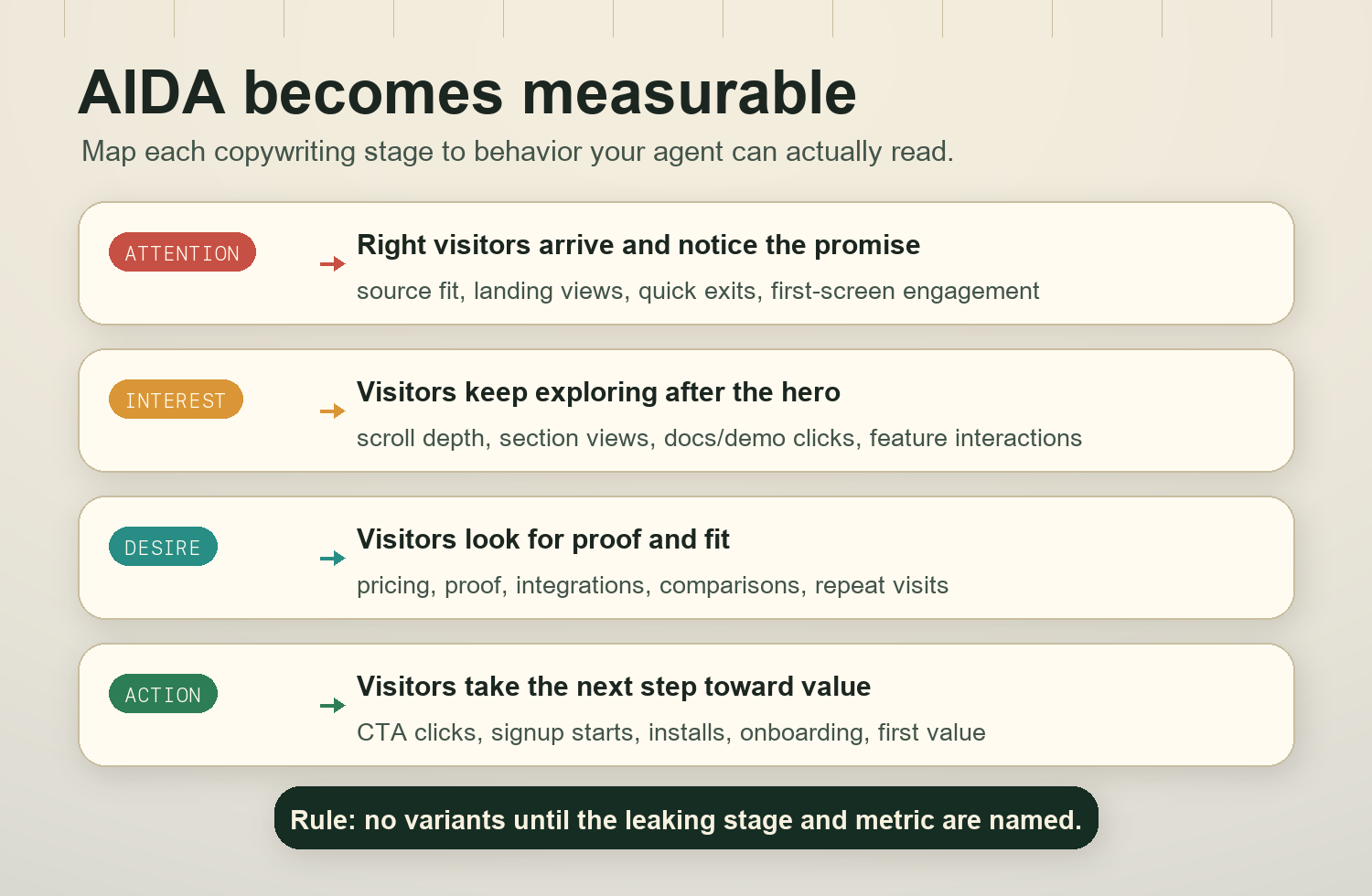
The human still owns taste, positioning, and risk. The agent does the repeatable work:
- pull recent page and event data,
- check whether the tracking is good enough,
- map landing-page signals to Attention, Interest, Desire, and Action,
- explain the biggest leak,
- recommend one measured next change.
That turns AIDA from copywriting trivia into an operating loop.
AI makes variant generation cheap; diagnosis scarce
If your prompt is “write me a better landing page,” your agent will probably comply.
It may produce:
- five headlines,
- three hero sections,
- a sharper CTA,
- a new testimonial block,
- a pricing-section rewrite,
- a longer FAQ.
Some of that might be good. But without diagnosis, the work is random.
A page with an Attention leak does not need a longer feature section. It needs a clearer first screen, better source-message match, or a traffic-quality fix.
A page with an Interest leak does not need a more aggressive CTA. It needs the next section to answer the visitor’s real question.
A page with a Desire leak does not need more clever copy. It needs proof, specificity, comparison, pricing clarity, integration detail, risk reversal, or evidence that the product works for this visitor.
A page with an Action leak does not need another paragraph. It needs less friction between intent and the next step.
This is the core rule:
Do not ask your agent for variants until it names the leaking AIDA stage.Map AIDA to measurable signals
AIDA is not a dashboard tab. Your agent has to translate it into signals available on your site.
Use this mapping as a starting point:
| AIDA stage | What it means on a landing page | Useful Agent Analytics signals |
|---|---|---|
| Attention | The right people arrive and notice the promise | sessions by source, landing page views, bounce or quick exits, first-screen engagement, campaign or referrer quality |
| Interest | Visitors keep exploring instead of leaving after the hero | scroll depth, section visibility, time-on-page, docs clicks, demo clicks, feature-section interactions, navigation to related pages |
| Desire | Visitors seek proof that the product fits their situation | pricing clicks, case-study clicks, integration clicks, comparison-page clicks, security or docs depth, repeat visits, high-intent section engagement |
| Action | Visitors take the next step and reach value | CTA clicks, signup starts, lead forms, install events, onboarding completion, first activation event, trial-to-activation quality |
Your exact events will vary. That is fine.
The important thing is that your agent writes down the mapping before judging the page. Otherwise it will optimize whatever metric is easiest to find.
A good AIDA diagnosis should say something like:
Attention is acceptable from organic search and direct, weak from paid social. Interest is weak because 71% of visitors leave before the proof section. Desire is inconclusive because pricing and integration events are under-instrumented. Action is low, but likely downstream of the Interest leak. Next test: move integration proof and one concrete outcome into the second section, then measure scroll-to-proof and CTA click rate from visitors who reached it.
That is much better than:
Try a punchier headline.
Install the Agent Analytics skill
The blog teaches you the operating model. The skill teaches your AI agent how to use Agent Analytics inside the codebase or project it is working on.
Install the public Agent Analytics skill:
npx --yes skills add agent-analytics/skills --skill agent-analytics --agent codex -y --copyIf you want to inspect the package first, list the available skills:
npx --yes skills add agent-analytics/skills --listThen open your project in your agent environment and have the agent verify three things before it diagnoses the page:
- Agent Analytics tracking is installed on the landing page.
- Important events exist for CTAs, signup or lead submission, and the first meaningful activation event.
- Project context contains durable product truth: target audience, main promise, activation definition, important CTAs, and recent page changes.
If one of those is missing, the first task is instrumentation or context cleanup, not copywriting.
Ask your AI agent to run the AIDA recipe
Copy this prompt into Claude Code, Codex, Cursor, Hermes, OpenClaw, or any agent with the Agent Analytics skill installed:
Use the Agent Analytics skill to run an AIDA diagnosis for this landing page using the last 14 days of live analytics. Map Attention, Interest, Desire, and Action to the available events and page signals. Identify the weakest stage, explain the evidence and caveats, and recommend one stage-specific change to test next. Do not write copy variants until you have named the leaking stage and the metric that will judge the change.If you already know the page changed recently, add this:
Before comparing results, check project context and annotations for recent landing-page, pricing, onboarding, or tracking changes. If the data crosses a major change, split the readout before and after that date.If your agent tries to jump straight into copy, stop it and ask for the measurement map first:
Use the Agent Analytics skill to compare landing-page CTA clicks, signup or lead events, and activation quality before recommending any AIDA copy variants. Show which events represent Attention, Interest, Desire, and Action, and flag missing instrumentation.The output should be boring and useful:
- the time window,
- the page or pages included,
- the AIDA stage mapping,
- the weakest stage,
- caveats about sample size or missing events,
- one recommended change,
- the metric that decides whether the change worked.
What to change for each leaking stage
Once the agent identifies the leak, the change should match the stage.
If Attention is leaking
Symptoms:
- traffic arrives but leaves quickly,
- certain sources perform much worse than others,
- the hero does not match the search query, campaign, or referring promise,
- first-screen engagement is low.
Ask your agent to test:
- a clearer headline that names the audience and outcome,
- message match for the top source or campaign,
- a hero section that shows the product category faster,
- a first-screen proof point instead of abstract positioning,
- source cleanup if the wrong visitors are arriving.
Measurement:
- first-screen engagement,
- quick-exit rate,
- scroll past hero,
- CTA visibility and click rate by source.
Do not fix Attention by adding more sections below the fold. Visitors have to care before they scroll.
If Interest is leaking
Symptoms:
- visitors get past the hero but do not reach important sections,
- docs/demo/feature clicks are weak,
- scroll depth drops before the product is explained,
- visitors do not engage with the next proof or explanation block.
Ask your agent to test:
- a second section that answers “how does this work?” faster,
- fewer abstract benefits and more concrete use cases,
- a clearer product walkthrough,
- a comparison between the old workflow and the new workflow,
- internal links to docs, examples, or demo paths that match visitor intent.
Measurement:
- scroll to the explanation/proof section,
- section engagement,
- docs/demo clicks,
- return visits from interested users.
Interest is usually where AI-generated pages become glossy but thin. The visitor keeps asking, “what is this really?” and the page keeps answering with adjectives.
If Desire is leaking
Symptoms:
- visitors read but do not show high intent,
- pricing, case-study, integration, security, or comparison clicks are weak,
- CTA clicks happen but signup quality is poor,
- the page does not answer risk, fit, proof, or “why now?” questions.
Ask your agent to test:
- proof tied to the target user’s actual situation,
- a short case example or before/after workflow,
- integration and setup details,
- pricing or plan clarity,
- objection handling near the CTA,
- screenshots or examples only if they are real and current.
Measurement:
- pricing or proof-section engagement,
- integration/docs clicks,
- CTA clicks after proof exposure,
- signup-to-activation quality,
- repeat visits from high-intent sources.
Desire is not hype. It is evidence that the visitor believes the product could work for them.
If Action is leaking
Symptoms:
- visitors show interest and desire but do not complete the next step,
- CTA clicks are high but signup or lead completion is low,
- signup starts do not become activation,
- the action path has unnecessary choices or friction.
Ask your agent to test:
- one primary CTA instead of competing CTAs,
- clearer button copy that says what happens next,
- lower-friction signup or handoff,
- fewer fields,
- better post-click onboarding,
- a next-step page that preserves the landing-page promise.
Measurement:
- CTA click to signup start,
- signup start to completion,
- install or setup completion,
- first activation event,
- activation quality by landing-page source.
Action is not just clicking the button. For an AI-builder product, the useful action is usually the first moment of product value.
The 7-day AIDA loop
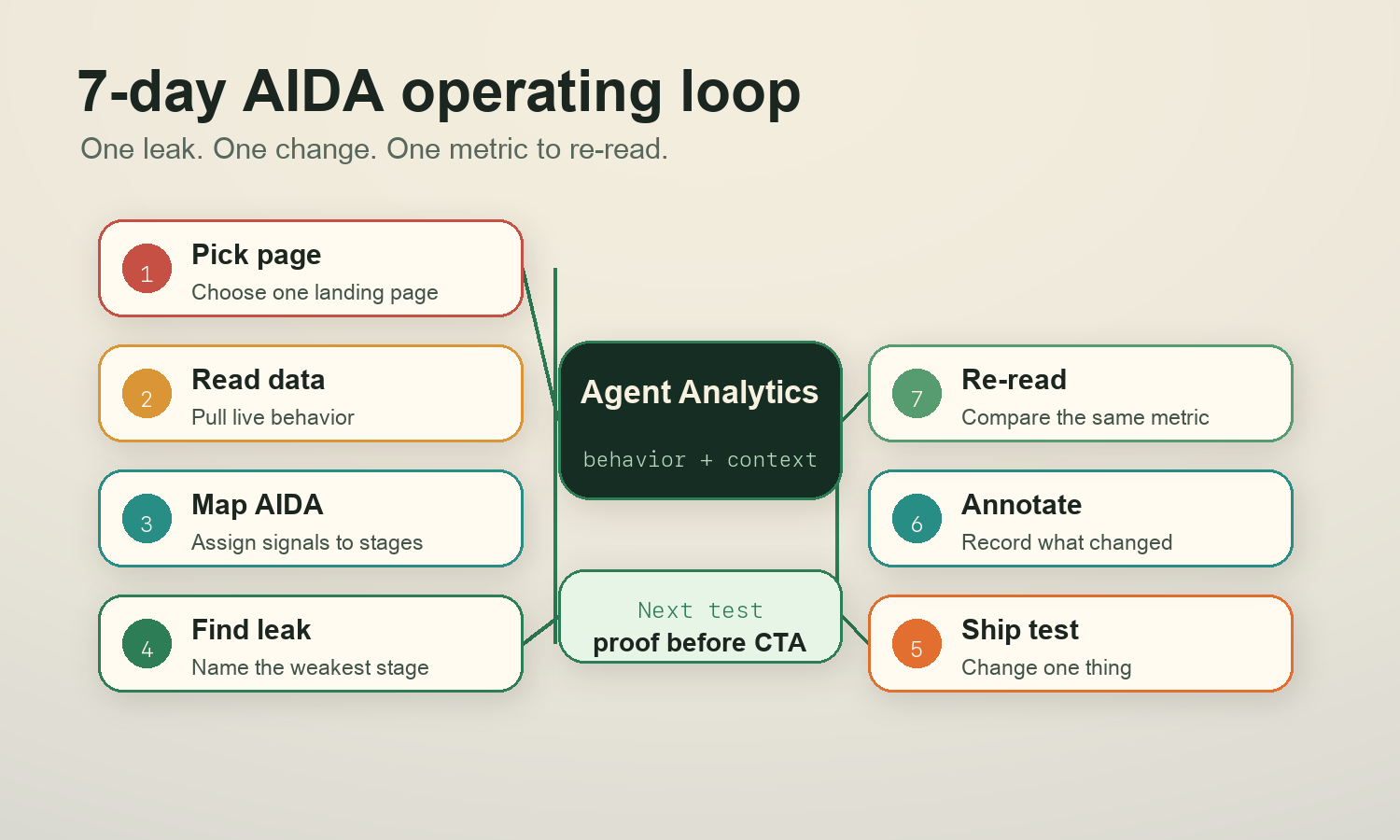
Do not turn this into a quarterly CRO ceremony.
Run it weekly:
- Pick the landing page or campaign page that matters this week.
- Ask the agent to map AIDA to live signals.
- Identify the weakest stage.
- Choose one change for that stage.
- Ship the change.
- Annotate the change in project context.
- Re-read the same stage signal after enough traffic.
The annotation matters. If your agent cannot see when the page changed, it will mix old and new data and overstate the conclusion.
Weekly operator prompt/checklist
Use this every week:
Use the Agent Analytics skill to run the weekly AIDA landing-page check for this project.

Checklist:
1. Confirm the landing page, date window, and any recent page or tracking annotations.
2. Map available analytics to Attention, Interest, Desire, and Action.
3. Identify the weakest stage using evidence, not vibes.
4. Flag missing or low-confidence instrumentation.
5. Recommend one stage-specific change for the next 7 days.
6. Name the exact metric or event that will decide whether the change worked.
7. Draft the smallest implementation plan, but do not broaden the test into multiple unrelated changes.
The best output is not a full redesign.
It is one measured next move.
Source appendix
- E. K. Strong, The Psychology of Selling and Advertising (1925). Strong popularized the AIDA sequence in sales and advertising education, building on earlier attention-interest-desire-action formulations often associated with E. St. Elmo Lewis.
- E. St. Elmo Lewis, early advertising and sales writing on attracting attention, maintaining interest, creating desire, and getting action. The exact origin history is messy, but AIDA is widely treated as a classic sales/copy funnel rather than a modern analytics model.
- Google Analytics documentation on events and enhanced measurement. Useful for thinking about page views, scrolls, outbound clicks, form interactions, and conversion events as measurable behavior rather than copy opinions.
- Nielsen Norman Group research and UX writing on scrolling, information scent, and user attention. Useful reminder that visitors decide quickly whether the next section is worth their effort.
- Agent Analytics skill install path:
npx skills add agent-analytics/skills. The skill-backed workflow in this post assumes the agent can read project analytics, inspect or improve event instrumentation, use project context, and summarize the next measured change.