🦞 Set Up Agent Analytics with OpenClaw (5 Minutes)
Add analytics to all your projects and let your AI agent track what's working. No dashboards. Just ask.

You shipped five projects this month. You’re not opening Mixpanel for all of them.
Your AI agent will.
Agent Analytics is the analytics platform your AI agent can actually use — track page views, run A/B experiments, and report back to you in chat. And with OpenClaw, setup takes about 5 minutes.
What’s New
Your OpenClaw agent can now handle your entire analytics workflow:
- Create projects and add tracking to your sites
- Query stats across all your projects in one conversation
- Run A/B experiments and check significance
- Run a scheduled daily brief — OpenClaw owns the recurring job, Agent Analytics provides the data
No dashboards. No browser tabs. Just conversation.
How It Works
1. Connect your agent
Sign up free at agentanalytics.sh and grab your API key. Store it in your environment secrets (AGENT_ANALYTICS_API_KEY), then tell your agent:
“Install the agent-analytics skill from ClawHub. My API key is in the environment variable
AGENT_ANALYTICS_API_KEY”
That’s it. Your agent installs the skill, picks up the key, and knows how to create projects, add tracking, query stats, and manage experiments. The key stays encrypted — it never appears in chat logs or conversation history.
2. Add tracking to your projects
This is where it gets good. Tell your agent:
“Set up analytics tracking for my-site.com”
Your agent will create the project, generate a tracking snippet, and tell you exactly where to paste it — one script tag before </body>:
<script src="https://api.agentanalytics.sh/tracker.js"
  data-project="my-site"
  data-token="aat_your_project_token"></script>
Page views are tracked automatically — path, referrer, browser, device, UTM params. No configuration needed.
Your agent also knows how to add custom events to your CTAs and key actions for deeper insights — signups, purchases, feature usage. Just ask:
“Add click tracking to the Get Started button and pricing CTAs”
Or do it yourself: Create a project in the dashboard, copy the snippet, and paste it into your site. You’ll need to add custom events manually via the tracking API.
3. Query your data
Ask your agent:
“How’s my site doing?”
It queries analytics and reports back in chat — stats, charts, and experiment results all in one place:
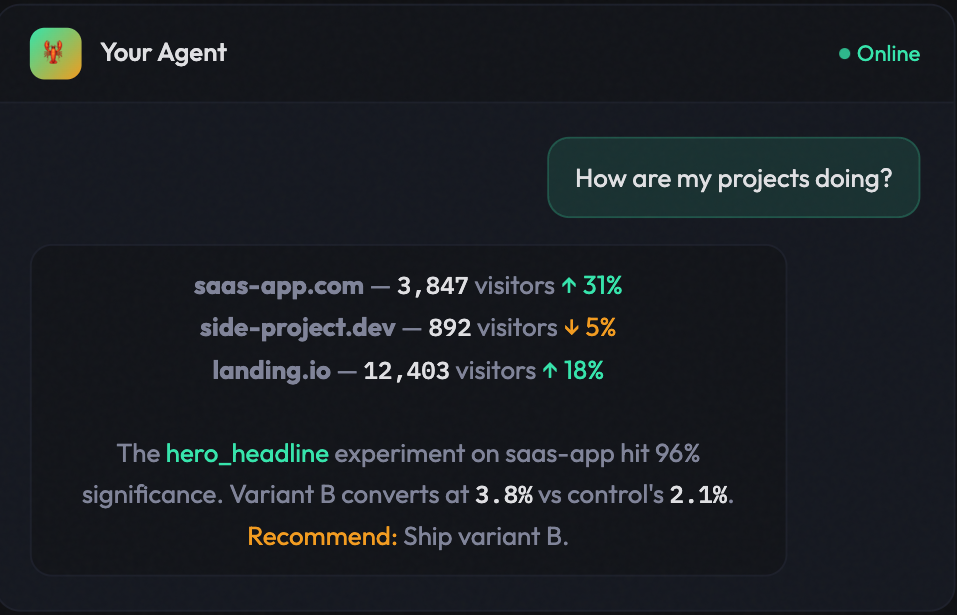
Stats, experiments, traffic, events — all from one conversation. Your agent queries the API and focuses on what matters across all your projects.
4. Schedule and manage experiments
The real power is agent-owned automation. Tell OpenClaw:
“Create a recurring 8:00 AM analytics job. Every morning, query Agent Analytics for the latest 24 hours across my projects and send me a short brief with anomalies, winners, drop-offs, and one recommended action.”
With OpenClaw’s scheduling, your agent owns the recurring task and Agent Analytics stays the measurement surface. The agent will:
- Query stats for all your projects
- Compare today vs yesterday and flag anomalies
- Check running A/B experiments for statistical significance
- Recommend winners and suggest next tests
Daily briefs, A/B experiments, scheduling, and recurring tasks belong in the agent environment. Agent Analytics gives that agent the API, CLI, and MCP surface it needs to do the job.
Why Not Traditional Analytics?
Mixpanel and GA are built for humans clicking dashboards. Agent Analytics is built for AI agents that query via API.
| Traditional Analytics | Agent Analytics | |
|---|---|---|
| Create a project | Manual setup per project | Ask your agent — it handles it |
| Query stats | Open browser, navigate dashboard | Ask your agent — it queries for you |
| 10 projects at once | 10 dashboards to check | One API key, one conversation |
| A/B testing | Separate tool (Optimizely, VWO) | Built in — your agent creates and checks experiments |
| Your agent owns the workflow | Built for humans, agents bolted on | Built for agents from day one |
Works With Any Agent
Agent Analytics isn’t just for OpenClaw. It works with any agent that speaks HTTP or MCP:
- 🦞 OpenClaw — full skill with CLI integration
- Claude Code / Cursor / OpenAI Codex — via the installation guides
- Windsurf / Trae — via the installation guides
- Claude Desktop / ChatGPT — via MCP-UI
Who It’s For
Indie hackers who ship 3-10 projects and lose track of which ones have traction. Developers tired of Mixpanel/Amplitude bloat for quick “is anyone using this?” questions. AI-assisted devs whose coding agent can query analytics instead of opening a dashboard. Privacy-conscious devs who want privacy-first analytics without cookies or PII.
Get Started
- Sign up at agentanalytics.sh — free tier includes unlimited projects and 1,000 events
- Install the skill — ask your OpenClaw agent to install it from ClawHub
- Self-host if you prefer — it’s open source on GitHub
Next up: Set Up Agent Analytics via MCP — for Claude Desktop, Cursor, and any MCP-compatible client.