The Login Pattern AI Agents Need
A safe login pattern for AI agents: the human owns identity, the agent owns the work, and no one pastes API keys into chat.

A human wants to give their agent another arm.
They are working in Claude Code, Codex, OpenClaw, Paperclip, or another agent environment, and they want the agent to connect to a service they already use.
Maybe that service is Agent Analytics. The human asks the agent to connect a project, install tracking, and read live analytics while it works.
Maybe it is Linear for issues, GitHub for repositories, Sentry for errors, Stripe for billing data, PostHog for product analytics, or Vercel and Supabase for deployment and infrastructure.
The human is still in charge. The agent is not becoming the account owner. The human just wants the agent to use the service on their behalf and keep working.
Then the service asks for login.
That is where most agent workflows break.
The bad patterns are familiar:
- paste an API key into chat
- give the agent a password
- put a long-lived secret in an environment variable
- ask the user to open a dashboard and copy something back
- hope a browser session is still alive when the agent needs it
- rely on a localhost callback when the agent is running somewhere else
These options are bad in two different ways.
Some move secrets through chat. An API key in a task thread is still a secret in a task thread. A password in an agent workflow is worse.
Others assume the human is sitting live with the running process. That is sometimes true. It is not always true.
The problem is this:
The human owns the identity. The agent owns the work. The service needs a safe handoff between them.
The Pattern
The login pattern AI agents need is not “give the agent your secret.”
It is:
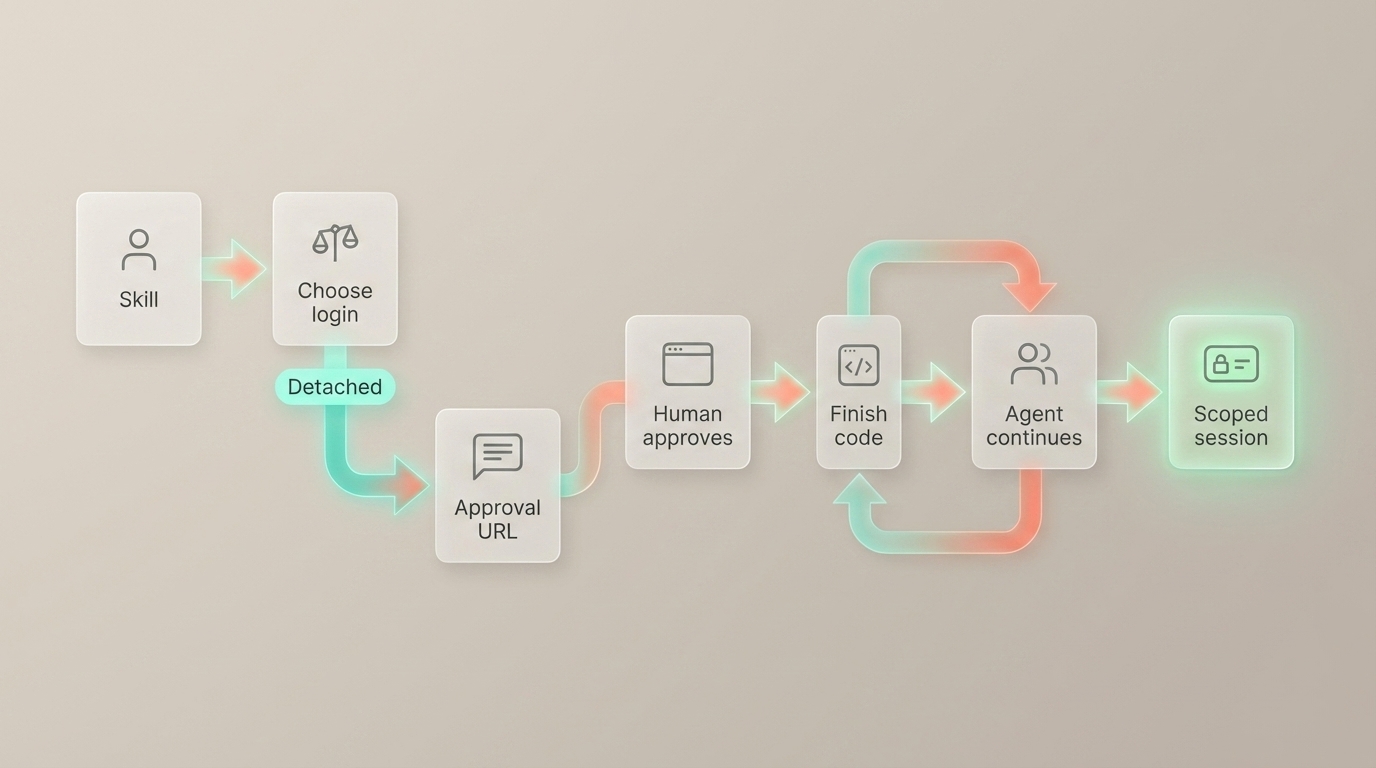
the human approves in the browser, then the agent receives a scoped session for the work.
That is the OAuth-style part. The user signs in with Google or GitHub in the browser. The service knows what is being approved. The agent never sees the user’s password. The chat or ticket never needs a permanent API key.
For Agent Analytics, the result is an agent session. It is scoped, revocable, and visible later in Account Settings -> Agent Sessions.
The hard part is not the browser approval. The hard part is getting the human’s attention in the right place.
That depends on how the human is using the agent.
Live Or Async
There are two common shapes.
In Claude Code or Codex, the human is often live with the agent. They see the terminal. The agent runs login. A browser opens. The human approves. The browser redirects to localhost, the CLI receives the callback, and the agent continues.
Normal login is good for that. The human is already watching.
In Paperclip, OpenClaw, and other task or message-based systems, the human may not be live with the process. The agent may be working from a task, a ticket, a message thread, a scheduled job, or a remote runtime.
In that world, localhost callback is the wrong assumption.
The agent needs to leave a clear blocked state:
I need human approval. Open this link, sign in, and send me the finish code.
That is detached login.
Detached Login
In Agent Analytics, detached login starts like this:
npx @agent-analytics/[email protected] login --detachedThe flow is short:
- The agent starts detached login.
- The service returns an approval URL.
- The agent posts the URL into the task, message, issue, or ticket.
- The work is blocked on human approval.
- The human opens the URL and signs in with Google or GitHub.
- The browser shows a finish code.
- The human replies in the same thread with that finish code.
- The agent exchanges the code for a scoped session and continues setup.
That is the whole product difference.
Normal login is for live agent work. Detached login is for async agent work.
The human still approves in the browser in both cases. The agent still gets a scoped session in both cases. The difference is the handoff.
The Agent Should Know
The human should not have to know whether the agent should run login or login --detached.
The agent should know.
That is why this guidance belongs in the skill or plugin, not only in a docs page.
For Agent Analytics, the public skill is the shared instruction layer. Codex can use it through skills.sh. OpenClaw can use it through ClawHub. Paperclip uses the same skill shape for company-task workflows. Claude Code has the Agent Analytics plugin mirror with the same guidance.
The skill tells the agent:
- use normal login when the human is live with the terminal
- use detached login in Paperclip, OpenClaw, remote workers, scheduled jobs, and issue/chat workflows
- do not ask the human to paste a permanent API key into chat
- post the approval URL, wait for the finish code, then continue
That makes the product feel smart. The human stays in control, and the agent gets the right kind of access for the work.
The Product Lesson
If your service wants to work well with agents, do not make API keys the normal setup path.
Let the human approve in the browser. Give the agent a scoped, revocable session. Support the live path for Claude Code and Codex. Support the detached path for Paperclip, OpenClaw, and async agents.
That is the login pattern AI agents need.
Read More
Implementation details:
Broader product context:
- Analytics Closes the Agent Feedback Loop
- If You Use Paperclip, You Need Agent-Readable Web Analytics
The short version:
The human owns the identity. The agent owns the work. The service owns the handoff.